Below: what counts as a static ad on Meta, the sizes Meta recommends, what Meta itself says works, eight layouts to start from, and how to test them.
What a static ad is
A static ad is one fixed image. No animation, no video, no sound. Everything has to land in the second someone looks at it.
The term is also used for banners and billboards. This guide is about Meta: Facebook and Instagram, where a static ad is simply the image ad format.
One distinction worth knowing: a static ad shows the same image to everyone, while a dynamic (catalog) ad pulls products from a feed to match each person (Marpipe's guide makes the same split). This guide covers the first kind: the images you design.
Why brands still run static ads
Video gets most of the attention. Static ads keep their place for three reasons.
- Speed. An image is quick to make and quick to adapt: the same idea in 4:5 for the Feed and 9:16 for Stories. Meta notes you can even create a photo ad from your Page by boosting a post with an image (Meta for Business, Photo Ads).
- Traffic and products. On the same page, Meta lists driving people to your site and raising awareness of a tangible product as the cases where photo ads are your best option. It cites a Facebook study where a series of photo-only ads outperformed other ad formats in driving unique traffic (the page gives no date or figures for that study).
- Testing. Because they are cheap to make, statics let you try more ideas. More on that below.
You'll also hear the opposite: "statics never worked for us." That can be true in one account. It isn't a rule. Which format wins for you is a result to measure, not a belief.
Static ad sizes for Meta
Here are the image specs from Meta's Ads Guide, read on November 26, 2026.
| Placement | Ratio | Recommended size | Minimum width | Primary text | Headline |
|---|---|---|---|---|---|
| Instagram Feed | 4:5 | 1440 x 1800 px | 500 px | 125 characters | 40 characters |
| Facebook Feed | 4:5 | 1440 x 1800 px | 600 px | 50 to 150 characters | 27 characters |
| Instagram Stories | 9:16 | 1440 x 2560 px | 500 px | 125 characters | not listed |
| Instagram Reels | 9:16 | 1440 x 2560 px | 500 px | 44 characters | not listed |
Sources: Meta Ads Guide, Instagram Feed, Facebook Feed, Instagram Stories, Instagram Reels.
All four take JPG or PNG files up to 30 MB. The Instagram Feed accepts ratios from 1.91:1 (landscape) to 4:5 (portrait). In Stories, an image ad stays on screen for 5 to 16 seconds, or until the person swipes away.
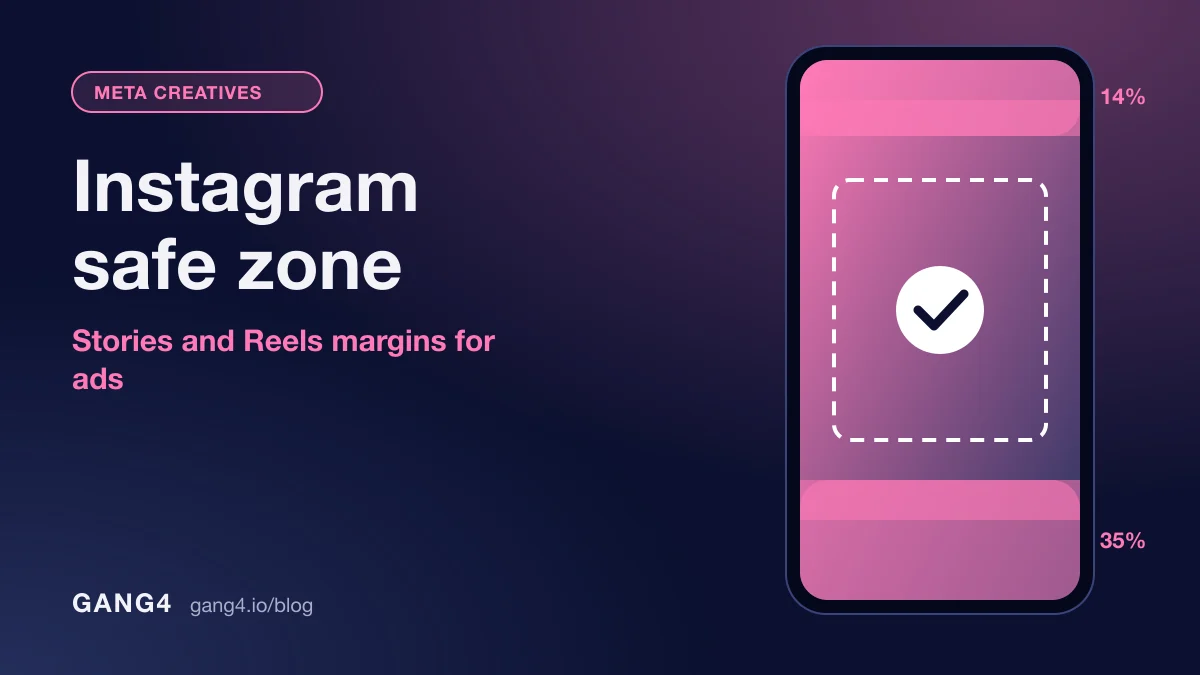
Two practical rules follow. Design for 4:5 first for the Feed, where most statics live. Then make a 9:16 version for Stories and Reels, keeping text out of the margins Meta's Instagram Stories and Reels pages ask you to leave free: roughly 14% at the top, 35% at the bottom and 6% on each side. The details, in pixels, are in our guide to Instagram safe zones.
What Meta says works in a static ad
Meta's photo ads page gives a short list of best practices (Meta for Business, Photo Ads). In its words, or close to them:
| Meta's advice | What it means for your design |
|---|---|
| Show people using your product | Ads run next to posts from friends and family. A person benefiting from the product fits in better than a packshot alone |
| "Remember less text is more" | Meta warns that too much copy is distracting and can lead to your ad being shown to fewer people. Keep the most important details only |
| Have a single focal point | Ask people to look at one thing. Too many things in one image? Meta suggests a carousel or a video instead |
| Maintain visual consistency | Across ad sets in one campaign, keep a common theme so people recognize your ads |
| Use high-resolution images | Follow the Ads Guide sizes above |
| Preview before you run | Check how the ad looks in each placement |
Put together, a strong static has one idea, one thing to look at, and only the words needed to understand it.
8 static ad examples to start from
Below are eight layouts that come up again and again in static ads. They are wireframes, not real ads: use them as starting points for your own ideas.
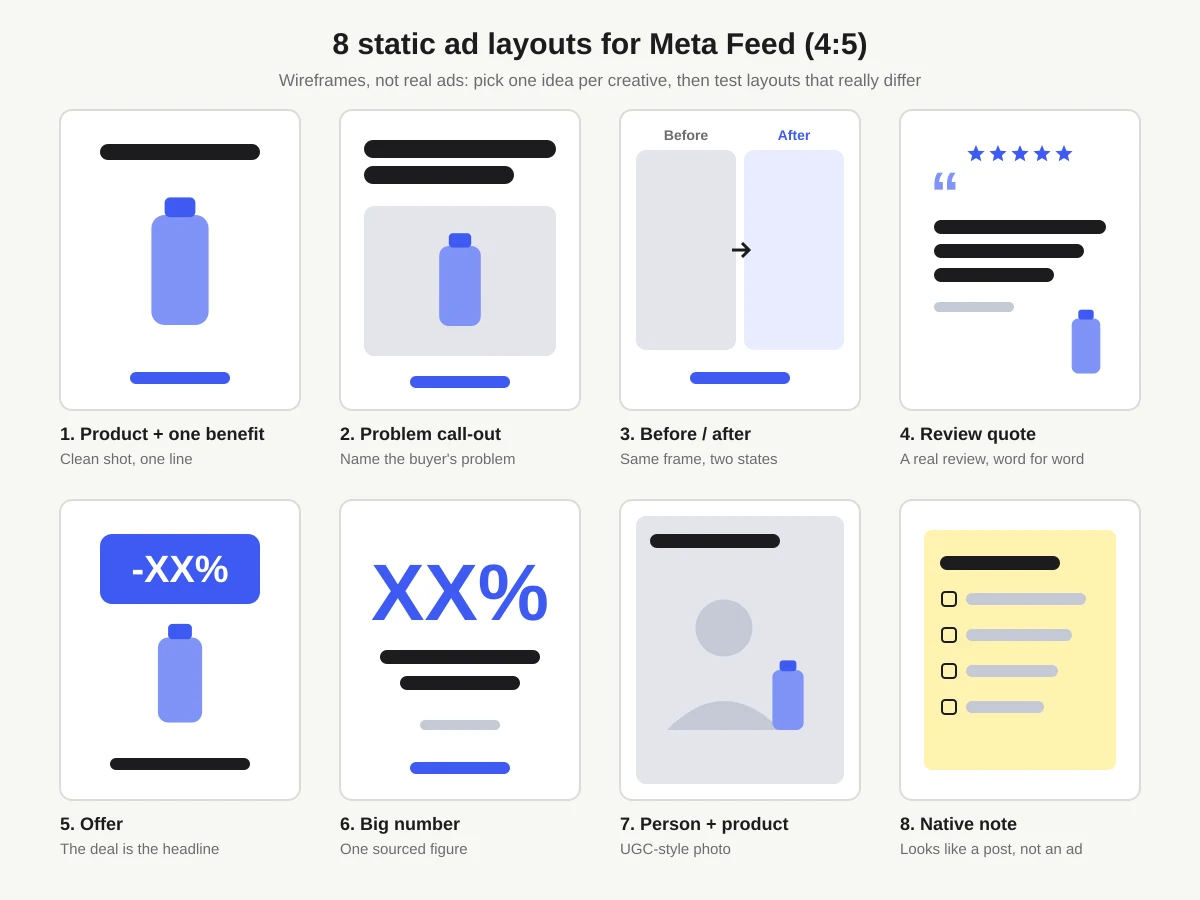
| Layout | When to use it | What breaks it |
|---|---|---|
| 1. Product and one benefit | A product people understand at a glance | Three benefits in one line |
| 2. Problem call-out | A pain the buyer names in their own words | A problem nobody says out loud |
| 3. Before and after | A visible result: a clean surface, a tidy room | A result you can't show honestly |
| 4. Review quote | Real reviews that say something specific | An invented or vague quote ("Love it!") |
| 5. Offer | A real promotion with a deadline | A discount on every ad, all year |
| 6. Big number | A figure you can source | A number with no source behind it |
| 7. Person and product | Showing who it's for and how it's used | A stock photo nobody believes |
| 8. Native note | A checklist or note that looks like a post | Small text nobody can read on a phone |
A few rules hold for all eight:
- The idea comes first. The layout only carries it. A weak angle in a good layout stays weak.
- Write for a phone. If the headline can't be read at arm's length, it's too long or too small.
- Prove what you claim. Reviews, numbers and before-and-after results need to be real, and you should be able to show where they come from.
- One call to action. Your ad can carry Meta's call-to-action button; if your image repeats it, keep it to that one clear action.
Layout 7 is where creator-style content fits: a real person showing the product in a real setting. When that image runs as a Partnership Ad, the header shows the person's account, with or without the brand's. Setup and rules are in our Meta Partnership Ads guide.
How to test static ads
Statics make it easy to produce ten versions in an afternoon. The trap is testing ten versions of the same ad.
Meta is explicit about it. Ads that share key visual and thematic attributes are grouped as variations of one creative, and ad images that are visually too alike can cause fatigue even if they are technically different files. Meta's advice: develop ads that are truly different in look, feel, storyline and message (Meta for Business, December 16, 2025).
In practice:
- Test concepts, not colors. A problem call-out against a review quote against a person with the product: three different ideas. The same image in blue and in green: one.
- Change one idea per creative. If you change the angle, the layout and the person all at once, you won't know what worked.
- Give each concept a fair run before judging it. The method, budget and timing are in our Meta creative testing guide.
Why different matters so much now: our explainer on Meta Andromeda covers how Meta's ad retrieval picks which creatives to show.
Static or video?
Both. An idea that works deserves a static version for the Feed, quick to adapt and refresh, and a video version for Reels and Stories. Run them side by side, compare them on enough results, and keep what holds up.
The real cost isn't choosing: it's producing enough distinct ideas, in both formats, to keep testing.
Where Gang4 fits
That's often the bottleneck: every new concept is another shoot or another design round. Running those creatives as Partnership Ads is worth it: Meta reports 19% lower CPA and 13% higher CTR on average when Partnership Ads are added to business-as-usual campaigns, compared with those campaigns alone (Meta, December 11, 2025). The catch is supply. A UGC video delivered through a platform that connects brands with creators costs €80 to €300 depending on the creator and format (takema-studio.com, accessed October 24, 2026), not counting the time it takes to find creators and the back-and-forth.
Gang4 is a platform that removes those steps. It gives you UGC-style creatives generated by AI from the likeness of real, consenting people, in static and video, free and unlimited with your subscription. You approve every creative and every profile before anything runs. They run as Partnership Ads from real profiles that are already connected, and you upload them to your Business Manager in one click. No image rights to negotiate and no Meta token to manage: every member has given consent and authorized the use of their image. Gang4 is a French platform and most of its members are based in France: book a demo to check that it fits your markets.