
Below: Meta's margins for every full-screen placement, the same margins in pixels, and how to build them into your editing setup.
What the safe zone protects
In Stories and Reels, the app draws its interface over your ad. Meta's spec pages say why the margins exist: to avoid cropping key elements or covering them with the profile icon or the call-to-action (Meta Ads Guide, Instagram Stories). For Instagram Reels video, Meta adds a third reason: elements placed too close to the edges of taller screens (Meta Ads Guide, Instagram Reels).
So the safe zone is a rule about what must stay readable, not about what can appear. Background and scenery can fill the whole frame. Your hook, captions, product, logo and offer can't.
Meta's safe zones, placement by placement
We read Meta's Ads Guide on November 20, 2026. All four full-screen placements give the same margins, for images and for videos.
| Placement | Recommended size | Keep free of text and logos |
|---|---|---|
| Instagram Reels | 9:16, 1440 x 2560 px | 14% top, 35% bottom, 6% each side |
| Instagram Stories | 9:16, 1440 x 2560 px | 14% top, 35% bottom, 6% each side |
| Facebook Reels | 9:16, 1440 x 2560 px | 14% top, 35% bottom, 6% each side |
| Facebook Stories | 9:16, 1440 x 2560 px | 14% top, 35% bottom, 6% each side |
| Instagram and Facebook Feed (image) | 4:5, 1440 x 1800 px | No safe zone on the spec page |
Sources: Meta Ads Guide, Instagram Reels video and image, Instagram Stories image and video, Facebook Reels video and image, Facebook Stories video and image, Instagram Feed and Facebook Feed.
Meta's wording shifts a little. The Instagram Reels video page says "at least" 14%, 35% and 6%; the others say "roughly." Read them as a floor, not a target.
Safe zone dimensions in pixels
Here are Meta's percentages applied to the two common vertical sizes (our math, rounded to the pixel).
| Creative size | Top (14%) | Bottom (35%) | Each side (6%) | Safe zone |
|---|---|---|---|---|
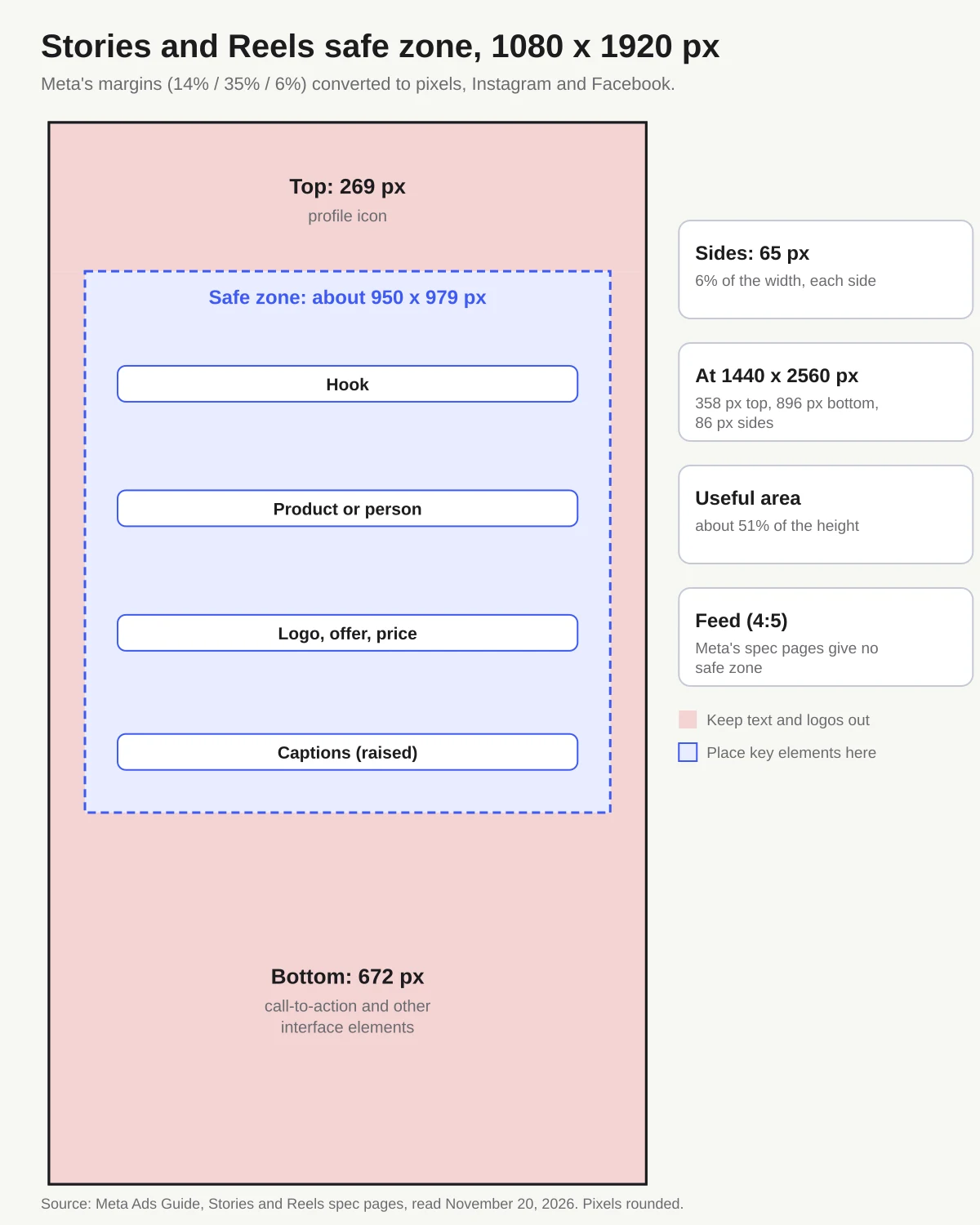
| 1080 x 1920 px | 269 px | 672 px | 65 px | about 950 x 979 px |
| 1440 x 2560 px | 358 px | 896 px | 86 px | about 1,268 x 1,306 px |
That leaves you 51% of the frame's height. If your hook runs to three lines and your product shot is wide, something will land in a band unless you design for it from the start.
Stories at 20%? Not in Meta's Ads Guide
A number you'll still see: a smaller bottom margin for Stories than for Reels. One guide lists 380 px (20%) at the bottom of Stories and 670 px (35%) for Reels (Lucid Media, May 10, 2026). A safe zone checker gives 20% at the bottom for Facebook Stories video (AdKit, updated October 21, 2026).
Every Stories page of Meta's Ads Guide we opened on November 20, 2026, Instagram and Facebook, image and video, said 35%. On a 1080 x 1920 px ad, that's 672 px instead of about 380 px. A caption sitting 400 px above the bottom edge passes the 20% rule and still lands inside Meta's bottom band.
If your templates use 20% for Stories, redraw them with the table above. And treat any pixel value without a source with suspicion: they vary from one guide to the next.
What goes where in a vertical ad
| Element | Where to put it | Why |
|---|---|---|
| Hook or headline | Top of the safe zone, just under the 14% band | First thing people read; above it sits the profile icon |
| Product or person | Center of the frame | The middle is the only area clear on all four sides |
| Captions | Above the 35% band; move them up if your editor places them low | Captions placed low end up inside the bottom band, under the interface. Meta lists captions as "optional, but recommended" for Reels video (Meta Ads Guide, Facebook Reels) |
| Logo | Inside the safe zone, away from the corners | Corners fall in the top or bottom bands |
| Offer, price, promo code | Above the 35% band | That band holds the call-to-action, which Meta's interface already shows: no need to draw a button |
Meta's spec pages give 6% per side. Some templates go further on Reels and reserve a wider column on the right, in the lower part of the frame (AdKit's Reels overlay does). If your hook or product runs close to the right edge, check it in a preview.
Running Partnership Ads? The header shows a person's account, with or without the brand's (our Meta Partnership Ads guide). It sits in the same top band, so the margins stay the same.
Build the safe zone into your editor
Checking each export by eye doesn't scale. Set the margins up once in the tool you edit in.
- Create guides or an overlay at your export size. Ruler guides at 269 px from the top, 672 px from the bottom and 65 px from each side on 1080 x 1920 px (358, 896 and 86 px on 1440 x 2560 px), or a transparent overlay with the bands shaded, like the diagram above.
- Save it as a template or a locked layer so every new project starts with it.
- Hide it before you export. An overlay left on ends up in your ad.
- Preview full screen on a phone before you upload. The interface you're avoiding is what you need to see.
The same setup matters when you test several versions of an ad: if one hook is longer and drops into the bottom band, you're testing readability, not just the message. Method in our Meta creative testing guide; why distinct creatives matter in our explainer on Meta Andromeda.
What about the Feed?
For an image in the Feed, on Instagram and Facebook, Meta recommends 4:5 at 1440 x 1800 px (Meta Ads Guide, Instagram Feed; Facebook Feed). Those pages give no safe zone.
You'll find Feed margins in pixels elsewhere: 100 px around a square, 250 px at the top and bottom of a 1080 x 1350 px 4:5 (Lucid Media, May 10, 2026). They are rules of thumb, not Meta specs; some tools say so themselves (AdKit calls its Feed overlays "optional safety buffers, not Meta requirements").
Keep text off the edges anyway, and don't just crop your 9:16 down to 4:5. Make a separate Feed cut with its text placed for that frame.
Where Gang4 fits
The more variants you run, the more this adds up: every new hook is another creative to produce and check against the bands. Running those variants as Partnership Ads is worth it: Meta reports 19% lower CPA and 13% higher CTR on average when Partnership Ads are added to business-as-usual campaigns, compared with those campaigns alone (Meta, December 11, 2025). The bottleneck is supply. A UGC video delivered through a platform that connects brands with creators costs €80 to €300 depending on the creator and format (takema-studio.com, accessed October 24, 2026), not counting the time it takes to find creators and the back-and-forth, and every new version means another shoot.
Gang4 is a platform that removes those steps. It gives you UGC-style creatives generated by AI from the likeness of real, consenting people, in static and video, free and unlimited with your subscription. You approve every creative and every profile before anything runs: check their margins like any other creative. They run as Partnership Ads from real profiles that are already connected, and you upload them to your Business Manager in one click. No image rights to negotiate and no Meta token to manage: every member has given consent and authorized the use of their image. Gang4 is a French platform and most of its members are based in France: book a demo to check that it fits your markets.