This guide covers what a dark post is, how it differs from a boosted post, how to create one, and what changes when the ad runs under a creator's name.
What a dark post is
"Dark post" is marketing slang, not a Meta product name. Meta's own term is unpublished post. Its help pages use it when they say that branded content posted "as an ad or unpublished post" must comply with its Advertising Standards (Meta Business Help Center).
The difference fits in two lines, according to an article on Jon Loomer's site (Lucas Elliott, updated March 1, 2025). A published post appears on the Facebook Page. An unpublished post never does: it only shows in News Feed and the ad's other placements.
That article covers Facebook Page posts. You'll also hear "Instagram dark posts" for the same idea: an ad built in Ads Manager rather than a post boosted from your profile.
Some dark posts are accidental. The same article notes that Lead Form posts are unpublished by default, and that posts for Instant Experiences, created in Ads Manager, are unpublished by default too.
Dark post vs boosted post
Both are ads. What changes is where they start.
| Boosted post | Dark post | |
|---|---|---|
| Starting point | A post already on your Page or profile | A creative built as an ad, with no post |
| Where you launch it | From your Page (Boost) | In Ads Manager |
| Visible on your Page | Yes | No |
| In the targeted audience's feed | Yes | Yes |
| In Meta's Ad Library | Yes, while it runs | Yes, while it runs |
Meta's help page on boosting describes the Page route: you pick the post on your Facebook Page and click Boost post (Meta Business Help Center). A dark post is set up in Ads Manager, like any other ad.
Why brands use dark posting
The first reason the Jon Loomer article gives is testing. An advertiser may test several creative or copy combinations, and may not want the Page's visitors to see every variation.
In practice, dark posting helps when:
- you test several versions of one idea: hooks, visuals, calls to action;
- the ad doesn't fit your organic feed: an offer for one segment, a message for one market;
- the creative never existed as a post: you upload it straight into Ads Manager.
To read the results properly, compare versions inside one test rather than ad by ad (how to run Meta creative testing).
How to create a dark post in Ads Manager
There is no "dark post" button. It is what you get when you create the ad without starting from a post on your Page.
- In Ads Manager, create your campaign and ad set as usual.
- At ad level, set up a new ad (upload the creative, write the text, add the link) instead of using an existing post.
- Publish. The ad runs without appearing on your Page.
Meta's menus change often: if a label has moved, look for the option to set up a new ad rather than use an existing post.
To find these posts later, the Jon Loomer article points to the Ads Posts tab of the Page Posts tool in Ads Manager, which shows posts that have already been used in ads. You can publish them to the Page afterwards.
One post can serve several ads. According to the same article, it is a common tactic for building on social proof: reactions and comments pile up on a single post.
Dark posts are not secret
Many guides describe dark posts as hidden, visible only to the people you target. That is true of your Page, not of the rest. According to Meta, the Ad Library contains all active ads shown across Meta technologies, and anyone can view and search it (Meta Business Help Center).
So your dark posts are visible to your competitors while they run, and theirs are visible to you. Searching a brand in the Ad Library is the quickest way to see the hooks and formats it is testing.
Dark posts and Partnership Ads
Is a dark post a "real" Partnership Ad, the kind that starts as a creator's organic post and is then promoted? For Meta, the format doesn't depend on an organic post.
A Partnership Ad shows the partner's and/or the advertiser's account in its header, and uses signals from both accounts for ranking (Instagram Help Center). It can start from two places:
- the creator's content, through a partnership ad code or a boost (partnership ad codes, step by step);
- nothing at all, through account-level permissions: the advertiser can then create Partnership Ads from the partner's handle "without pre-existing content" (Instagram Help Center; how to request account-level permissions).
In the second case, Meta tells creators that the ad "won't show up on your profile or Page" (partnership ad specifications for creators). That is a dark post in marketing terms. And it is a Partnership Ad in Meta's terms: same header, same signals from both accounts.
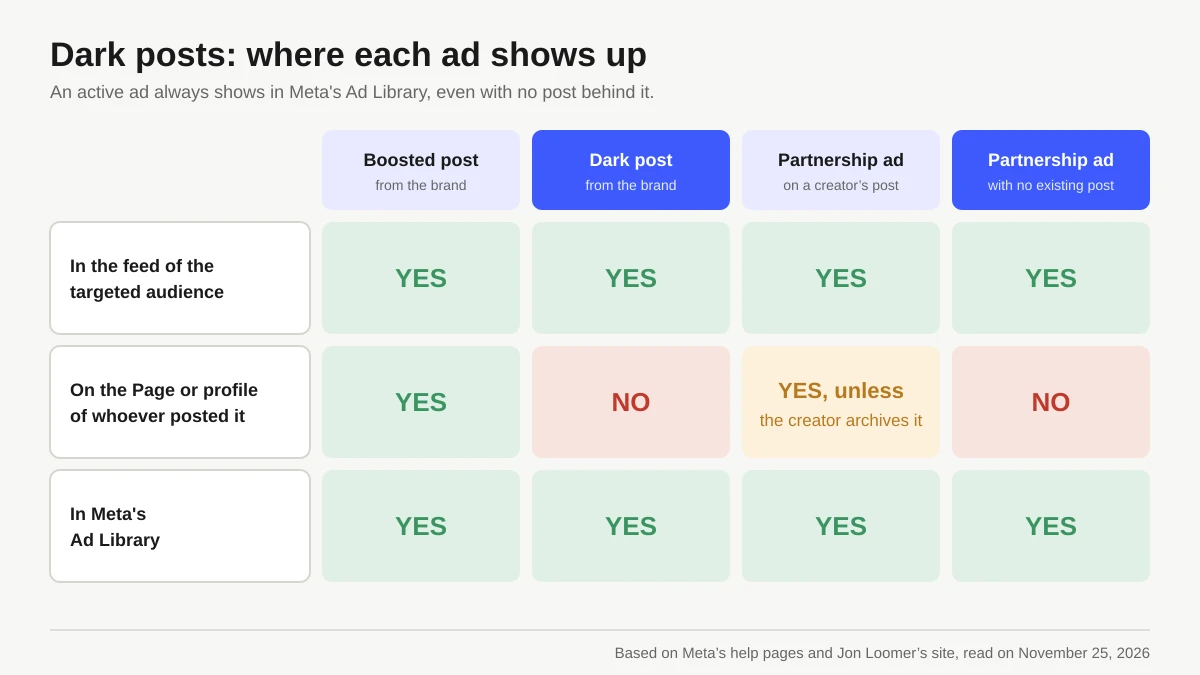
On a creator's post, the content stays on their profile unless they archive it (Instagram Help Center). With no existing post, nothing appears there. Either way, the ad is listed in the Ad Library.
Whose name is in the header
You choose it in Ads Manager, under Identities. According to Instagram Help, you can show both accounts, the partner only, or use dynamic identity, where Meta picks whichever is expected to perform best. Meta recommends dynamic identity. Up to 2 identities can show, and ranking uses signals from both accounts whichever you pick.
Where a click on the profile goes
When the creator's account is in the header, a tap on their name leads to their profile. Meta even warns creators that their profile may receive increased traffic when their content is used in an ad (Instagram Help Center). If you want your brand to show too, pick the header with both accounts.
What the creator keeps control of
A dark post in a creator's name can't be run behind their back. You need their permission, and Meta says partners can revoke it at any time (Instagram Help Center).
When the ad uses one of their posts, two more rules apply (partnership ad specifications for creators): they can't edit the content while it runs as an ad, and deleting it stops the ad.
With a creator: dark post or organic post
Pick a dark post, through account-level permissions, when you want the ad in the creator's name without them posting anything.
Start from the creator's organic post when:
- the content already works on the creator's account: a partnership ad code is enough to turn it into an ad;
- you want the content to stay visible on their profile for their followers after the campaign.
For the choice between ad code and permissions, and the full setup, see the Meta Partnership Ads guide.
Where Gang4 fits
Meta's numbers push toward Partnership Ads: 19% lower CPA and 13% higher CTR on average when Partnership Ads are added to business-as-usual campaigns, compared with those campaigns alone (Meta, December 11, 2025).
The hard part is upstream. A UGC video delivered through a platform that connects brands with creators costs €80 to €300 depending on the creator and format (takema-studio.com, accessed October 24, 2026), not counting the time it takes to find creators and the back-and-forth. Every new version means another shoot, and the permission request, approval and contract start over with each creator. Gang4 is a platform that removes those steps. It gives you UGC-style creatives generated by AI from the likeness of real, consenting people, in static and video, free and unlimited with your subscription. They run as Partnership Ads from real profiles that are already connected, and you upload them to your Business Manager in one click. No image rights to negotiate and no Meta token to manage: every member has given consent and authorized the use of their image. Gang4 is a French platform and most of its members are based in France: book a demo to check that it fits your markets.